THE PLAYER'S GUIDE
About Tetris
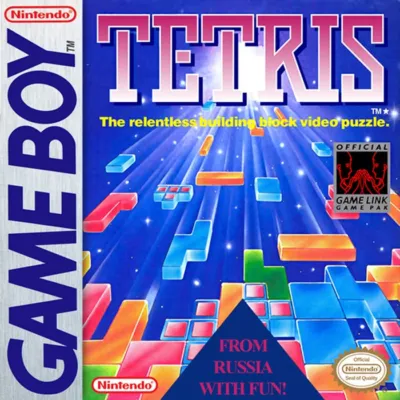
Tetris is a 1989 Game Boy puzzle game developed by Nintendo. It plays right here in your browser.
A falling block can be a welcome answer or an awkward new problem. Game Boy Tetris makes that small moment of recognition the heart of every session. With two solo challenges and a compact set of controls, it suits both a quick puzzle break and a longer attempt to keep an increasingly crowded field under control.
The game
Build rows, make room
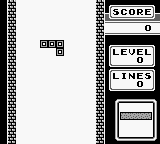
The setting is a plain game field, and the building materials are seven shapes made from four squares each. Move and turn each falling piece to complete horizontal rows without gaps. Finished rows disappear, bringing the blocks above them down. Your task is to keep creating space before the pile reaches the top. The NEXT window adds a small but valuable planning horizon: you can see the piece that will follow the one you are placing.
Endurance or a finish line
A-TYPE asks how long you can last and how high you can score, with the falling speed increasing as the game progresses. B-TYPE gives you a defined target of 25 cleared lines at a fixed speed. Its HIGH setting determines how many random blocks occupy the field at the start. Clearing several rows with one piece earns more points than a single-row clear, giving both modes a reason to balance immediate relief against a more ambitious setup.
This edition
The Game Boy edition
The original cartridge also includes a competitive mode requiring two Game Boys, two Tetris cartridges, and a Game Link cable. Doubles, triples, and four-line clears send different amounts of extra material to the opponent. Solo top-score tables accept names, but those records disappear when the original hardware is switched off.
Start here
- Choose your session
Select 1-PLAYER at the title screen and press START. For an opening practice session, choose A-TYPE so you can concentrate on placement without an initial pile to untangle.
- Set the sound
On the game-type screen, press A to move into music selection. Choose music A, B, C, or OFF, then press START to continue.
- Give yourself thinking time
Choose LEVEL 0 for your first attempt. The slower starting pace gives you more time to recognize each shape and try both rotation directions before committing it to the pile.
Original controls
These are the original game's controls. For keyboard, controller and touch settings in this player, see Controls & help.
- Control Pad Left / Right
- Move the falling piece horizontally.
- Control Pad Down
- Make the current piece fall faster.
- A Button
- Rotate the piece 90 degrees clockwise.
- B Button
- Rotate the piece 90 degrees counterclockwise.
- START
- Pause during play; press again to resume.
- SELECT
- Hide or restore the next-piece display during play.
Playing tips
- Check underneath
Before placing a piece across a hollow, look for any empty squares it will seal off. An accessible gap is easier to work with than a buried one that requires clearing the rows above it.
- Keep an escape route
When the stack grows tall, take an available clear instead of waiting indefinitely for a larger scoring opportunity. Extra room also gives future pieces more space to move and turn.
- Practice one difficulty at a time
Use B-TYPE to make practice more deliberate. Keep LEVEL unchanged while increasing HIGH, or keep HIGH unchanged while raising LEVEL, so each attempt introduces one main challenge.

 Your next world.
Player memories
Remember Tetris? Share a memory or a tip for other players.
The next memory could be yours.
Sign in to leave a memoryLoading the memory card…