

THE PLAYER'S GUIDE
About The Legend of Zelda: Link's Awakening DX
A gigantic egg crowns Koholint Island, and the stranger who washes ashore has plenty to discover beneath it. Link’s Awakening DX suits players who enjoy working out a place as much as fighting through it: village conversations, curious landmarks, and dangerous rooms all give this handheld adventure its inviting rhythm.
The game
An island with a riddle
Marin rescues Link after a storm wrecks his ship on the journey home to Hyrule. An owl points him toward the sleeping Wind Fish, whose awakening holds the answer to his predicament. The main quest leads through eight dungeons, each housing a Nightmare that guards one of the Sirens’ musical instruments.
Tools change the journey
Your equipment grows as you meet people and explore dungeons. New abilities change how you handle the landscape: Roc’s Feather lets you jump, the Power Bracelet lets you lift and throw objects, and Flippers work automatically in water. Dungeon obstacles also reward simple physical investigation. Pushing a movable stone can uncover an object or trigger a door, making the room itself part of the puzzle.
This edition
The Game Boy Color edition
DX adds color graphics and an exclusive dungeon to the original Game Boy adventure. This guide covers that Game Boy Color edition. Its two assignable item buttons make choosing your current equipment a regular part of play.
Start here
- Create your file
Press START through the opening to reach Player Select, then choose an empty slot. Enter a name of up to five letters: use the + Control Pad to choose letters, A to enter them, and B to erase. Press START to finish, then select your new file.
- Follow the opening errand
Begin by looking for the sword and other belongings washed onto the beach. This gives your first exploration a concrete destination before you start ranging farther across the island.
- Learn your status display
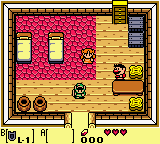
Check the hearts and selected items on the main screen before moving on. Empty hearts mean lost health; losing them all ends your quest. The left item belongs to B and the right item to A, so a quick glance tells you what each button will do.
Original controls
These are the original game's controls. For keyboard, controller and touch settings in this player, see Controls & help.
- + Control Pad
- Move in eight directions and navigate menus. Walk toward an unobstructed ledge to leap down.
- A and B
- Use the assigned item. A also talks, reads, and advances messages; B cancels messages. Face a treasure chest and press either button to open it.
- START
- Open the Sub-Screen. Highlight an item and press A or B to assign it. Inside a dungeon, this screen also shows its map and your dungeon items.
- SELECT
- Open the island map. Move its cursor with the + Control Pad; press A for a location’s name and B to dismiss it.
- Sword and shield buttons
- Press the sword’s assigned button to swing; hold it to charge, then release for a stronger Whirling Blade attack. Press the shield’s assigned button to raise your defense.
Playing tips
- Let the map refresh your memory
When you lose your bearings, inspect the map’s message markers. They can replay important information you previously heard, helping you recover a lead without retracing every conversation.
- Pair tools for distance
Once you own the Pegasus Boots, try equipping them alongside Roc’s Feather. Running before jumping carries you farther, so reconsider a wide gap when an ordinary jump falls short.
- Keep your facing steady
Hold the sword button to keep Link facing the same direction while moving. Use this when repositioning around an enemy without turning your blade away from it.
- Watch limited supplies
Check the number beside equipment with limited uses, such as the Bow, before relying on it for a fight. Keeping another usable option ready can prevent an awkward equipment change mid-encounter.

 Your next world.

Player memories
Remember The Legend of Zelda: Link's Awakening DX? Share a memory or a tip for other players.
The next memory could be yours.
Sign in to leave a memoryLoading the memory card…