Sonic 3 & Knuckles Online: How to Play the Full Game in Your Browser
Want to play Sonic 3 & Knuckles online? Learn what the combined game is, how lock-on works, which characters to pick, and how to find it in your browser.
You can play Sonic 3 & Knuckles online in a desktop or mobile browser, with no console and no cartridges. The thing to look for is the combined game, where Sonic the Hedgehog 3 and Sonic & Knuckles run back to back as one long adventure. Many pages only offer one half, so check the title before you press start. Below you’ll find what the combined version adds, how the original lock-on trick worked, which character to pick first, how controls and saving behave, and where to start on our site.
TL;DR
-
Sonic 3 & Knuckles is Sonic the Hedgehog 3 and Sonic & Knuckles joined into one game. Playing them together gives you the complete story and the true ending.
-
Search for the combined title, not “Sonic 3” alone. Sonic 3 by itself is only the first half of the adventure.
-
You can choose Sonic, Tails or Knuckles, and the combined game lets each one visit zones from both halves.
-
Browser play works on any modern browser. Keyboard, gamepad and touch setups differ by site, so check the controls before you start.
-
Our Genesis page is the place to browse Sega’s 16-bit library for free, with no download and no sign-up.
Table of Contents
What Sonic 3 & Knuckles actually is
Sonic 3 & Knuckles is not a third separate game. It is the combined form of two Sega Genesis releases: Sonic the Hedgehog 3 and Sonic & Knuckles. SEGA’s own Sonic site describes the pair as a front half and a second half of one continuous adventure, with the combined game delivering the true ending.
There is a reason for the split. According to the Sonic & Knuckles entry on Wikipedia, the two games began as one larger project. Development time and cartridge-size limits pushed Sega to release it as two games. That history explains why the combined version feels like a single, very long campaign: it was designed as one.
In practice this means:
-
Sonic the Hedgehog 3 alone gives you the first half of the zones and a story that stops without a proper conclusion.
-
Sonic & Knuckles alone gives you the second half of the zones, without Tails and without a save feature, as the same Wikipedia entry notes.
-
Sonic 3 & Knuckles runs both in sequence, so you play from Angel Island Zone through to the final showdown.
When you search for the game online, the combined title is the one most players actually want.
How lock-on worked, and why it matters in a browser
On a real Genesis, Sonic & Knuckles was a cartridge with a hatch on top. You slotted Sonic the Hedgehog 3 into it, and the console saw one combined game. SEGA calls this lock-on system the defining feature of the title: two cartridges physically joined to make Sonic 3 & Knuckles.
The combined game changes several things, according to Sonic Retro’s game page:
-
The intended complete narrative plays out from start to finish.
-
Characters can enter each other’s zones. Knuckles can play Sonic 3 zones, and Tails can play Sonic & Knuckles zones.
-
Progress can be saved.
-
You can collect Super Emeralds, which unlock Hyper forms for Sonic and Knuckles and a Super form for Tails.
In a browser there is no cartridge to insert. Emulation handles it in software. A technical discussion on Retrocomputing Stack Exchange explains that an emulator can simulate the combined game by mapping ROM data into the Mega Drive processor’s address space. For you, the practical upshot is simple: a good online version loads the already-combined game, so you never have to think about hatches or connectors.
Choosing your character: Sonic, Tails or Knuckles
You pick from three playable characters, and each one plays differently. The Sonic 3 & Knuckles Steam manual sums up the differences:
| Character | Signature ability | Best for |
|---|---|---|
| Sonic | Insta-shield | Players who want the classic, fast, momentum-driven experience |
| Tails | Flying and swimming | Newcomers, or anyone who wants to skip tricky platforming |
| Knuckles | Gliding and wall climbing, plus unique routes | Players who like exploring and finding shortcuts |
Which one should you start with?
If this is your first run, start with Sonic. His moves are the baseline the level design is built around. Once you know the zones, a second run as Knuckles is a different game: gliding and climbing open up routes Sonic never sees. Tails is a good pick when you want to relax and enjoy the music and scenery, since flight lets you recover from mistakes.
Controls and devices
The original Genesis pad has a D-pad and face buttons. In the game, you move with the D-pad and use a button to jump, then press again in the air to trigger your character’s special move. Online versions map those actions to your keyboard, a gamepad, or on-screen touch buttons.
For reference, a modern fan-made port, Sonic 3 A.I.R., documents what a PC setup looks like in its game manual. It lists keyboard controls for movement and jumping, support for Xbox controllers, and configurable bindings for other gamepads. Most browser players work the same way: a plug-in controller usually feels better than a keyboard for a game that rewards precise jumps.
A few practical tips:
-
Use a modern browser. Browser-based ports and emulators generally rely on WebAssembly, which is supported by recent versions of Chrome, Firefox, Safari and Edge, as the Sonic 3 A.I.R. manual notes for browsers released after 2017.
-
Plug in a controller if you can. A USB or Bluetooth pad is easier than arrow keys for spin dashes and tight platforming.
-
Go landscape on a phone. Touch controls need room, and the game’s wide screen suits horizontal play.
-
Check the key map before you start. Different sites bind jump and action buttons differently.
If you want a walkthrough of how browser retro play works in general, our guide on how to play retro games in your browser covers the basics.
Saving your progress
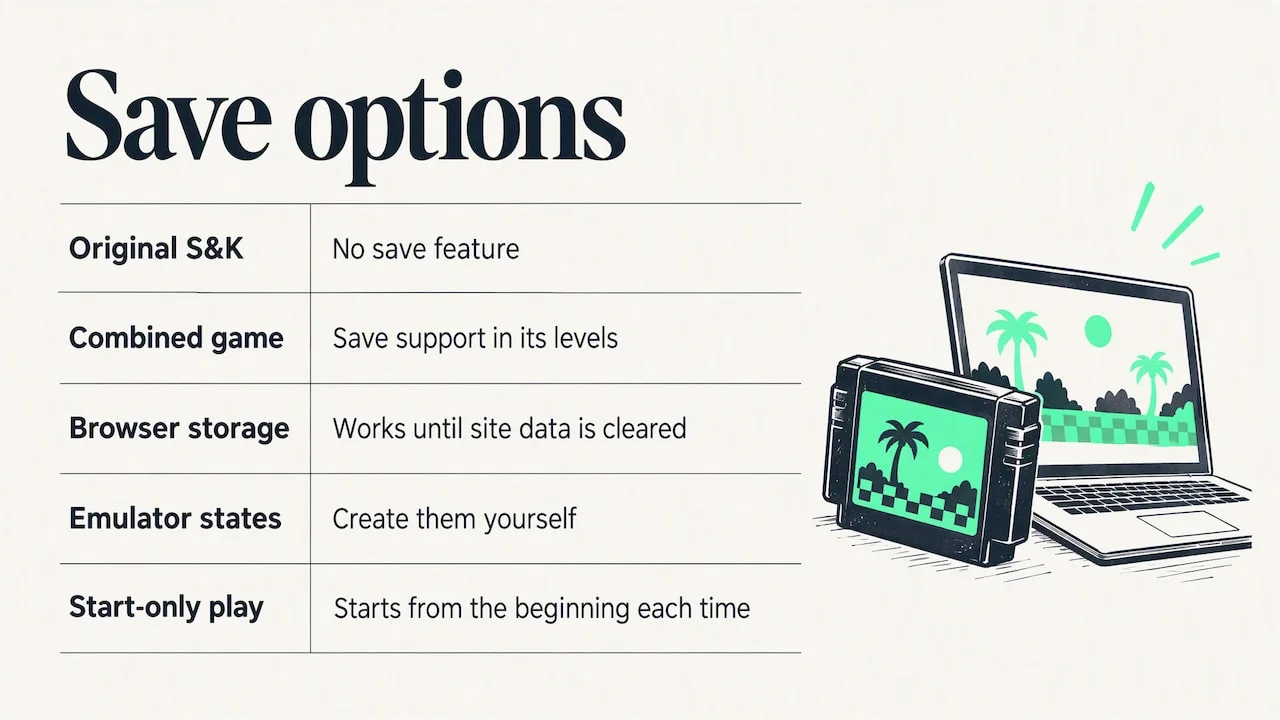
Saving is one of the biggest reasons to choose the combined game. On original hardware, Sonic & Knuckles on its own has no save feature, but when it is locked on with Sonic 3, it gains save support in its levels, per Wikipedia’s Sonic & Knuckles entry.
What that means online depends on the site. Some browser versions keep a save slot in your browser’s storage, which works until you clear your site data. Others only offer emulator save states you create yourself, and others let you play only from the start each time. Before you commit to a long run, look at the page’s menu for a save option and test it on the first act.
The game is long, so plan for it. A full playthrough across both halves, plus the Super Emerald hunt, takes real time. Short sessions work well if you can save between zones.
Official releases versus browser play
You have several ways to meet this game today, and it helps to know the difference.
-
Official collections. Sonic Origins, released in 2022, bundles a rebuilt version of Sonic 3 & Knuckles. Its manual lists 16:9 widescreen, save game management and infinite retries in Anniversary Mode, while Classic Mode keeps the original 4:3 ratio and gameplay mechanics.
-
Fan projects. Sonic 3 A.I.R. has a public beta for iOS and web. Its setup asks you to supply your own game file, and browser play needs an HTML5 browser with WebAssembly.
-
Browser retro sites. These load a game in a tab so you can jump in at once. This is the fastest route if you only want to play for a while.
The official releases add modern comforts. Browser play gives you the original feel in seconds, and costs nothing on our site.
Perspective
We built Back2OldGames because starting an old game should take seconds, not an afternoon of installers, accounts and pop-ups. Sonic 3 & Knuckles is the perfect example. It is a game people remember from childhood, and the first thing they want is to press a button and see Angel Island burn.
That is why we keep our approach simple. Our games run in your browser. There is no download and no sign-up, and we don’t use ad networks. We fund the site through hand-picked sponsorships, so you never pay and your attention isn’t sold to the highest bidder.
Our advice for this particular game: play the combined version, start with Sonic, and give yourself a full session. The second half is where the game earns its reputation, and it is worth seeing the true ending.
Jack The Mayor
Where to start on Back2OldGames
Our Genesis page lists 990 classics for the console Sonic made famous, and the full games catalog lets you search more than 16,000 titles by name. Look for the Sonic games there, and for anything we don’t have yet, you can request a game.
We also have the Retro Passport, which lets you earn experience points and collect stamps as you play, plus daily challenges and game recommendations if you like a nudge toward something new. These are optional, and you never need an account to play.
Play retro games free, right now
Back2OldGames lets you play classic games in your browser, free, with no download and no sign-up. We keep the experience clean on purpose: our aim is no intrusive ads and no registration walls, so the game is the first thing you see. Head to the Back2OldGames home page to start, or grab the Android app to play on your phone.
If you enjoy Sonic, the rankings page is a good way to find what other players rate highly across the catalog.
FAQ
Is Sonic 3 & Knuckles the same as Sonic 3?
No. Sonic the Hedgehog 3 is the first half of the adventure. Sonic 3 & Knuckles combines it with Sonic & Knuckles into one continuous game, and the combined version gives you the true ending, according to SEGA.
Can I play as Knuckles in the first half of the game?
Yes, in the combined game. Characters can play each other’s zones, so Knuckles can play Sonic 3 zones, and Tails can play Sonic & Knuckles zones, as described on Sonic Retro. Played separately, you don’t get that crossover.
Do I need a controller to play in a browser?
No, a keyboard works, but a gamepad is more comfortable. Controller support varies by site, so check the key map or controller settings before you start. A phone works too, usually with on-screen touch buttons.
Can I save my progress?
The combined game supports saving, as Wikipedia notes. In a browser, how saves are stored depends on the site, so look for a save option in the menu and test it early. Clearing your browser data can erase browser-stored saves.
Sources
Keep reading.

Old Fighting Games: The Classics That Built the Genre
A guide to old fighting games from Karate Champ to Street Fighter II and Mortal Kombat: what made each one matter and how to play retro fighters free online.
Read the story
Classic Role-Playing Games: What to Play and Where
A practical guide to classic role-playing games: the landmark titles, what defines each era, and how to play retro RPGs online for free in your browser.
Read the story